PNG-1.png?width=120&height=31&name=AIPOWER%20LOGOPrimary%20logo%20(Colour)PNG-1.png)
3. Set up your system to IntelliCharge
4. Connect your system (you are here)
5. Start using the IntelliCharge platform
 You can always click the question mark in the top right corner to get help directly on the platform.
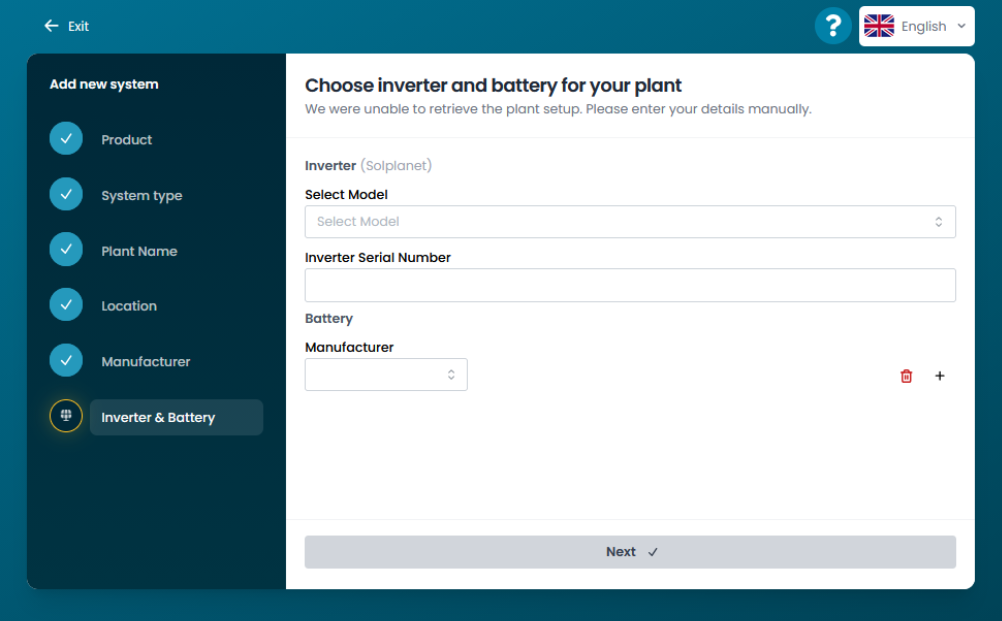
4.1. Connect your Solplanet system
Enter your inverter model, inverter serial number, battery model and capacity. We will automatically connect your system to IntelliCharge. This will typically happen within 24 hours, after which you will be able to view data in your dashboard.
PLEASE NOTE!
We recommend reviewing the following settings:
-
If Solplanet AI (Solplanet's own control system) has previously been activated, it must be deactivated. This is done by changing the battery mode to self-consumption in the Solplanet app. This is necessary for IntelliCharge to take over control of your system.
If you do not update these settings, you risk not getting the full optimisation from IntelliCharge, or IntelliCharge may not function at all.